What Does Synchronous Really Mean?
Clarifying the often-confused concepts of sync, async, blocking, and non-blocking

In this post, I want to talk about what synchronous — a concept used across various models including I/O and networking — actually means, and explore the difference between synchronous and asynchronous approaches. I’ll also briefly touch on blocking and non-blocking, two concepts that are frequently confused with sync and async.
Before diving in, I want to make one thing absolutely clear: synchronous and asynchronous are mechanisms concerning the guaranteed order of process execution, while blocking and non-blocking are concepts about the idle state of a process. They are entirely separate ideas.
Because the mechanics of synchronous + blocking and asynchronous + non-blocking feel more intuitive, many people mistakenly treat these pairs as identical or similar. But as I just mentioned, they focus on completely different things and have almost no direct relationship. They are simply combined in use.
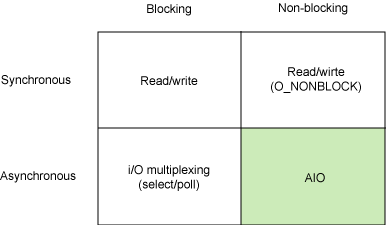 Source - Boost application performance using asynchronous I/O, IBM
There are already plenty of excellent posts on this topic by talented writers, but most of them bundle these concepts together, which makes it easy for newcomers or those unfamiliar with computer science to assume they’re related. The reason so many posts cover them together is simply that in actual implementations, these concepts are used in combination — making it harder to explain them separately.
So I’ll inevitably be explaining them together as well, but rather than focusing on the more intuitive blocking & non-blocking concepts, I’ll center the discussion on the more abstract synchronous & asynchronous.
What Does Synchronous Actually Mean?
If you read posts about synchronous programming, you’ll find that people interpret the word differently. Some say it means things happening at the same time, others describe it as communicating on a specific clock cycle, and still others define it as making states identical. With so many uses of the word, there are equally many interpretations. It’s hard to know which one is right.
I too was confused when I first learned the concept — the word “synchronous” and its mechanism just didn’t click. Terms like “blocking” are easier to grasp because they come up in everyday contexts like sports, and the meaning of “to block something” is immediately intuitive. But “synchronous”? Not so much.
The most common everyday usage of the word is probably synchronization. Think of the sync feature in iTunes when transferring music to an iPhone. In that context, synchronization means “making two different states identical.”
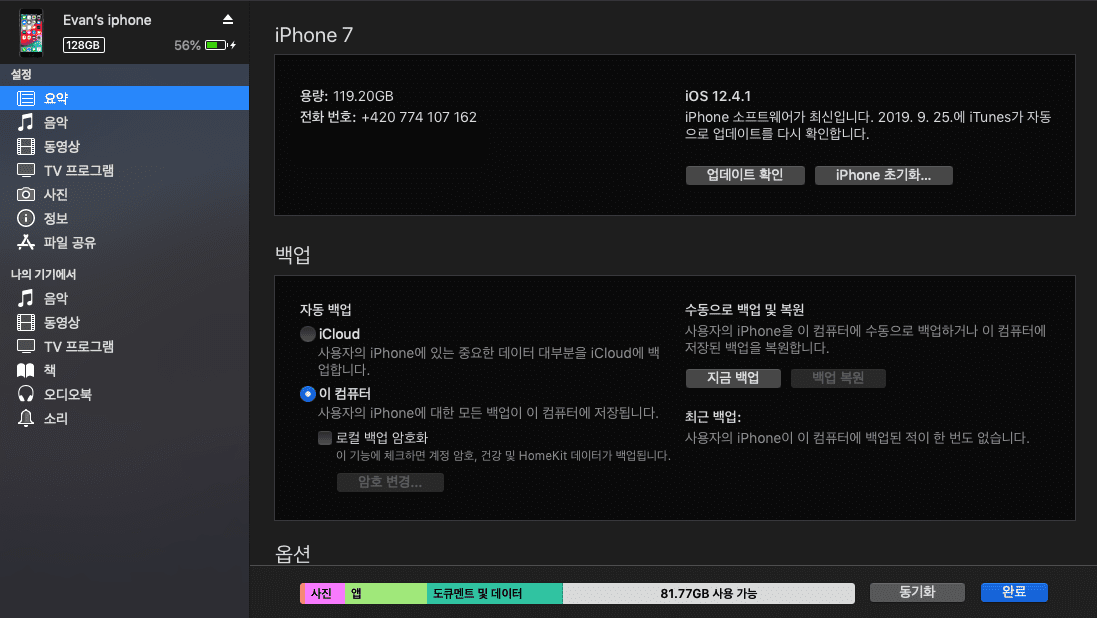 We've all had the experience of losing all our iPhone music after a bad sync, right?
But in computer science, “synchronous” is mostly explained as “happening at the same time,” which feels different. Of course, there are cases like database synchronization where it carries the same meaning, but since many posts discuss I/O and networking, the former interpretation tends to dominate.
Between the words synchronous and asynchronous, “asynchronous” simply means “not synchronous” — so we should focus on understanding what synchronous precisely means.
Understanding the Nuance of the Word
In high school, you might have heard the advice “the answer is in the passage” when studying language or foreign language sections. In engineering and science, terminology is often derived from English, and the translation process can sometimes produce words that are harder to understand than the originals. That’s why grasping the original English word’s meaning matters.
It might feel like we’ve suddenly switched to a language lesson, but I personally think this process is important. It helps us understand why the word “synchronous” can carry different meanings in different contexts.
 Don't memorize — understand
Looking at the Korean translation “동기(同期),” it uses the characters for “same” (同) and “period” (期), literally meaning “same period” or “same cycle.” It’s the same word used when Koreans refer to colleagues who joined a company or military service at the same time. But this literal meaning doesn’t quite match what we mean by “synchronization.”
After all, syncing an iPhone with iTunes isn’t about aligning their periods or cycles, is it?
But the English word “Synchronous” actually carries a slightly different nuance:
synchronous [adjective]
: happening, existing, or arising at precisely the same time
First, note that “synchronous” is an adjective. And its meaning is “happening or existing at precisely the same time.” Since it’s an adjective, it doesn’t specify what is happening at the same time. Now let’s look at the noun “synchronization”:
synchronization
: the state of being synchronous
Synchronization is “the state of being synchronous.” In other words, synchronous and synchronization are fundamentally the same concept.
Moreover, all words derived from “Synchro” — Synchronize, Synchronization, Synchronous — share a common nuance: the feeling of things progressing identically at the same time. Whether it’s states, actions, or events, they all evoke the sense of things moving in unison.
 A classic example of "synchro"
So, making an iPhone and iTunes share the same state is synchronous because once the operation completes, both simultaneously arrive at an identical state. And what computer science calls synchronous — events happening at the same time — is also a synchronous event. Both interpretations share the same underlying nuance.
Even the etymological root “Syn-” simply carries the meaning of “together,” which is why it works in contexts like:
He and I are out of sync in everything
For words that are difficult to translate literally, it’s better to understand them through their nuance. To sum up: words using “Synchro-” all share the nuance of “things progressing identically at the same time.” Whether it’s state unification (synchronization) or simultaneous events (synchronous processing in CS), the underlying nuance is the same.
Synchronous in Computer Science
Many posts explain synchronous as “the request and response of the current task happening at the same time,” but I’ve always felt a contradiction there — the word “simultaneous” suggests no time gap, yet there’s inevitably some duration between a request and its response.
Technically, “simultaneous” doesn’t strictly mean an instantaneous moment (just as “simultaneous outbreaks” don’t happen in a single instant), but given how we commonly use the word, it doesn’t feel intuitive.
That’s why I think it’s more accurate to say what happens simultaneously is not “the current task’s request and response,” but rather “the current task’s response and the next task’s request.” (After all, “synchronous” is an adjective with no subject.)
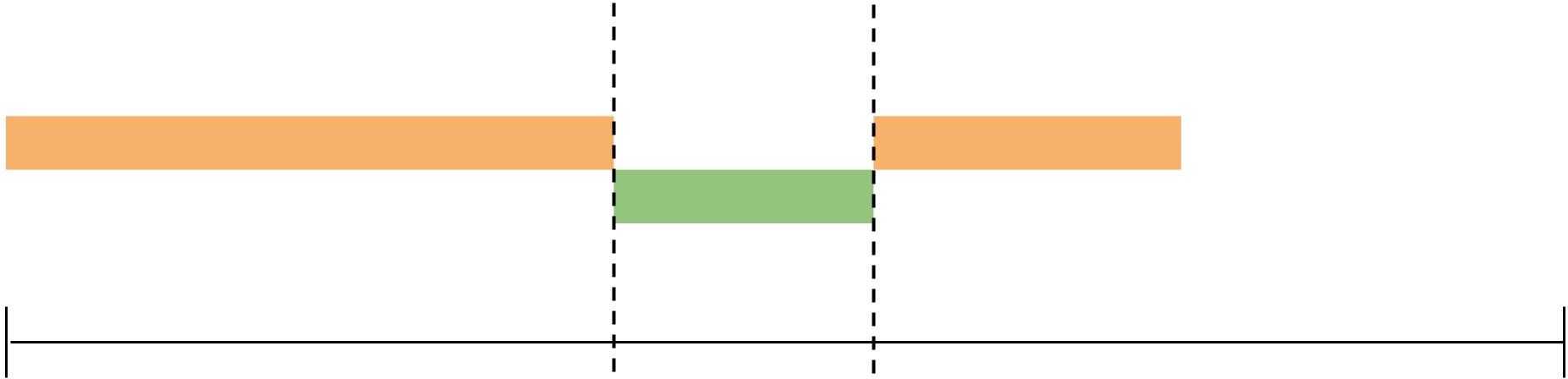 Synchronous: the response of the current task and the request of the next task are timed together
In other words, saying the current task’s response triggers the next task’s request simultaneously means that tasks proceed in a definite order. And “response” here is flexible — in a network model, it could be a server’s response; in an I/O model, it could be the return of process control.
Let’s look at the most common example of a synchronous approach.
Synchronous + Blocking
The most common synchronous pattern we encounter is the synchronous & blocking approach. Because it’s synchronous, the sequential flow of tasks is guaranteed. Because it’s blocking, no other task can proceed while one is in progress.
function employee () {
  for (let i = 1; i < 101; i++) {
    console.log(`Employee: Attaching doll eye #${i}`);
  }
}

function boss () {
  console.log('Boss: Arrives at work');
  employee();
  console.log('Boss: Leaves work');
}

boss();
Boss: Arrives at work
Employee: Attaching doll eye #1
Employee: Attaching doll eye #2
...
Employee: Attaching doll eye #100
Boss: Leaves workLooking at this code, we naturally know these tasks will execute in order. Internally, it’s because tasks are pushed onto a single call stack and processed LIFO (Last In First Out), but let’s just focus on the fact that tasks proceed sequentially.
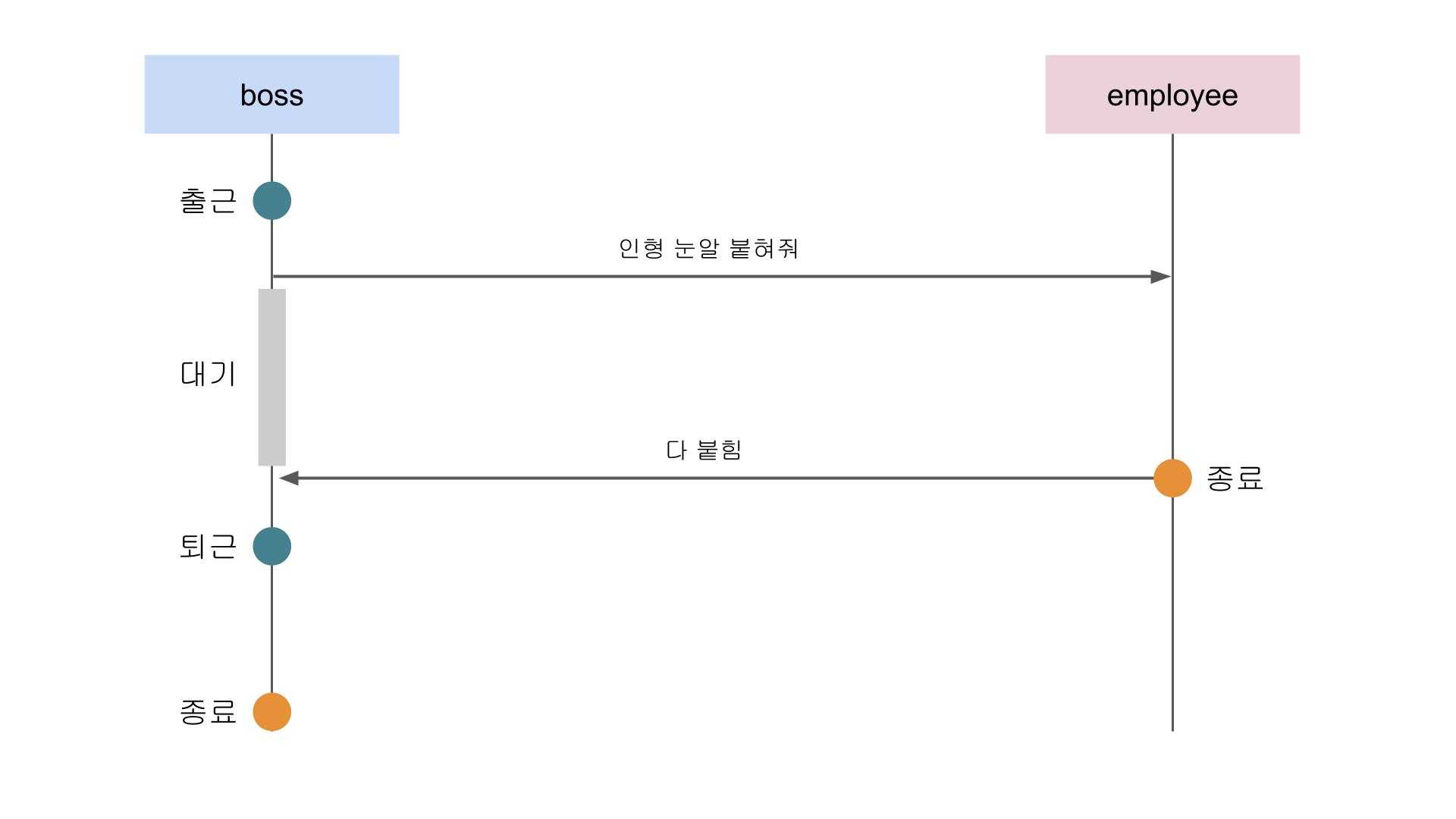 No going home until all the doll eyes are attached
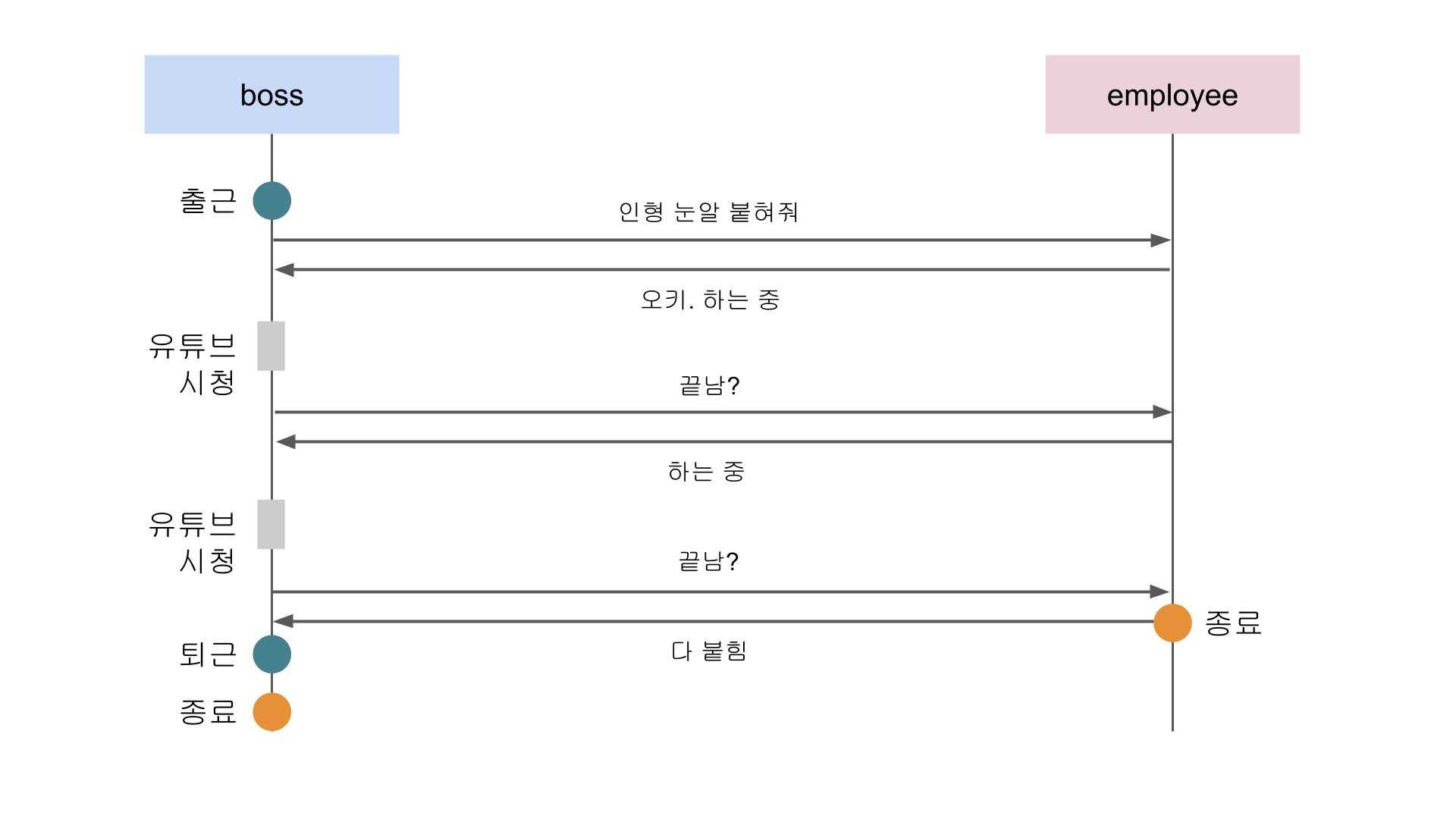
The parent process boss performs its “arrive at work” task, then requests the child process employee to attach doll eyes. Only after this task completes can boss perform its “leave work” task.
Simply put, the parent process — the one giving orders — cannot leave until the child process finishes. This synchronous + blocking mechanism is what most people picture when they think of “synchronous,” and it’s intuitively easy to understand.
But can the boss function do other things while employee is attaching doll eyes, while still maintaining a synchronous flow?
Synchronous + Non-Blocking
Absolutely. Whatever the case, synchronous means tasks have a sequential flow — as long as this premise holds, everything else is fair game. This is precisely why we can’t say synchronous === blocking.
Using JavaScript generators, we can maintain task order while letting the parent process do its own work:
function* employee () {
  for (let i = 1; i < 101; i++) {
    console.log(`Employee: Attaching doll eye #${i}`);
    yield;
  }
  return;
}

function boss () {
  console.log('Boss: Arrives at work');

  const generator = employee();
  let result = {};

  while (!result.done) {
    result = generator.next();
    console.log(`Boss: Watching YouTube...`);
  }

  console.log('Boss: Leaves work');
}

boss();
Boss: Arrives at work
Employee: Attaching doll eye #1
Boss: Watching YouTube...
Employee: Attaching doll eye #2
Boss: Watching YouTube...
...
Employee: Attaching doll eye #100
Boss: Watching YouTube...
Boss: Leaves workHere, the parent process boss arrives at work, calls the child process employee to attach doll eyes, and periodically checks whether the work is done.
If the task isn’t finished yet, boss also diligently performs its own task of Watching YouTube. This code clearly follows a synchronous flow, but since boss is also doing its own work in between, it’s using a non-blocking approach.
 While you work, I'll sneak in some YouTube
In this example, just like in the synchronous & blocking approach, boss absolutely cannot leave work until employee finishes. The order of tasks is preserved. In other words, as long as the sequential flow is maintained, synchronous doesn’t care whether it’s blocking or non-blocking.
Asynchronous in Computer Science
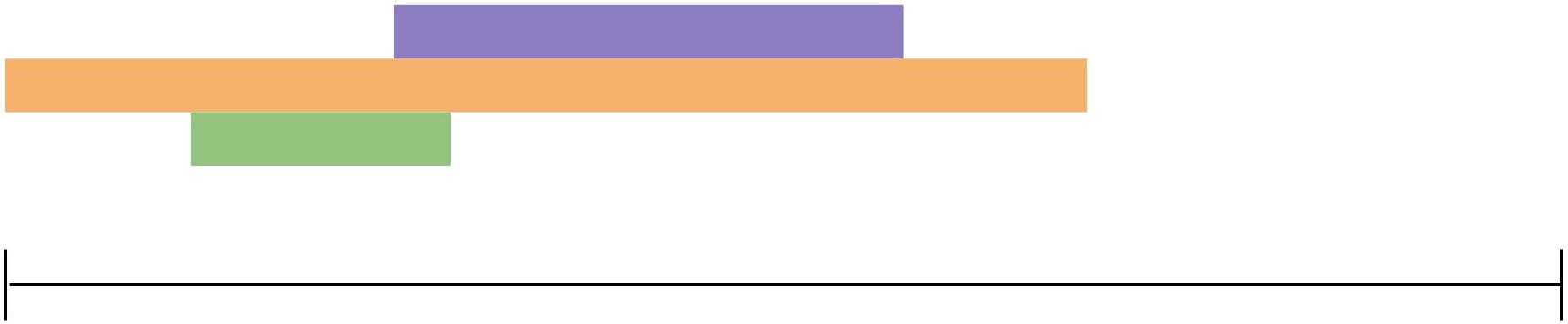
I described synchronous as the timing of the current task’s response and the next task’s request being aligned. Asynchronous literally means “not synchronous,” so think of it as the opposite: the current task’s response and the next task’s request don’t have to be aligned.
 Once you assign the task, you don't care when it finishes
In a synchronous approach, the parent process must be aware of when the child process’s task ends. Whether the child has produced a result or is still working, the parent is always keeping track of the completion point.
But in an asynchronous approach, once the parent process assigns a task, it doesn’t care whether the task is in progress or finished. Just as with synchronous, whether the parent can do its own work or not is a separate question.
Also, since the parent process doesn’t care about the child’s completion status, there’s no guarantee that tasks will finish in sequential order. Let’s start with the familiar async & non-blocking pattern.
Asynchronous + Non-Blocking
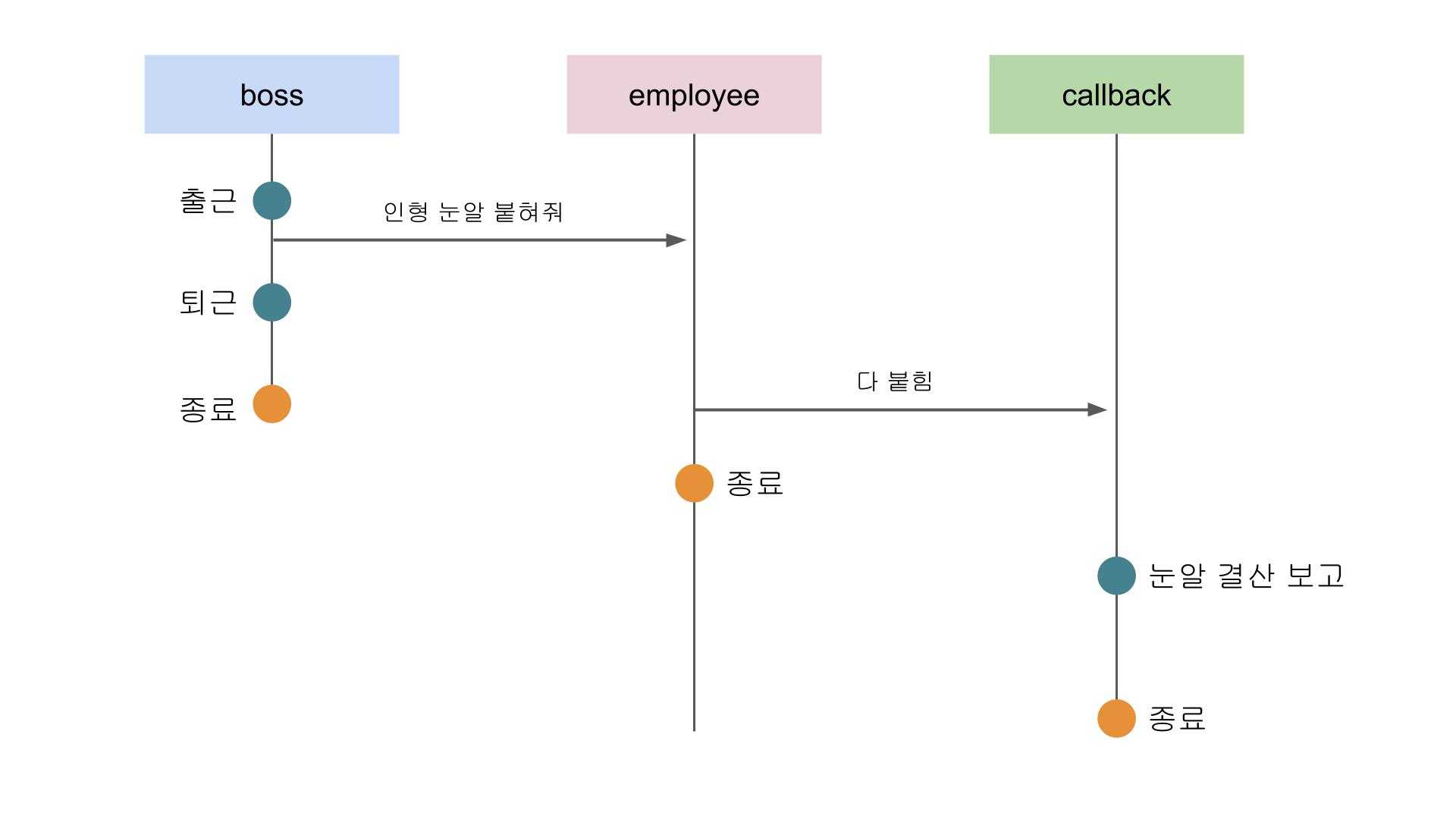
The combination of asynchronous and non-blocking is a pattern we’re very familiar with. Since it’s asynchronous, the parent process doesn’t bother tracking the child’s completion. When the child finishes, it will either report back to the parent on its own or delegate to another process.
And since it’s non-blocking, the parent can continue with its own work after assigning the task.
function employee (maxDollCount = 1, callback) {
  let dollCount = 0;
  const interval = setInterval(() => {
    if (dollCount > maxDollCount) {
      callback();
      clearInterval(interval);
    }
    dollCount++;
    console.log(`Employee: Attaching doll eye #${dollCount}`);
  }, 10);
}

function boss () {
  console.log('Boss: Arrives at work');
  employee(100, () => console.log('Employee: Eye count final report'));
  console.log('Boss: Leaves work');
}

boss();
Boss: Arrives at work
Boss: Leaves work
Employee: Attaching doll eye #1
Employee: Attaching doll eye #2
...
Employee: Attaching doll eye #100
Employee: Eye count final reportHere, boss tells employee to attach 100 doll eyes and immediately leaves work.
The parent process boss doesn’t care when employee finishes. The completion signal is handled by the Eye count final report task passed in as a callback.
 The boss gives orders and heads straight home
The async & non-blocking approach is efficient because it can handle multiple tasks simultaneously. However, overly tangled asynchronous processing can make it difficult for developers to follow the application’s flow. This is exactly why JavaScript introduced syntax like Promise and async/await — to make asynchronous flows clearer and more explicit.
Also, even asynchronous approaches like Node.js’s event loop contain synchronous patterns under the hood, so overusing async can create bottlenecks somewhere.
Asynchronous + Blocking
Finally, let’s look at the less common concept of asynchronous & blocking. This pattern isn’t commonly used at the application layer — it appears in low-level contexts like I/O multiplexing models in Linux and Unix operating systems. So let’s let our boss and employee go home and continue the explanation without them.
At first glance, this combination might seem purely inefficient. The advantage of async is that by not waiting for child processes to finish, you can handle multiple tasks simultaneously. If the process is blocked and sits idle, it can’t process anything.
But this concept emerged for good reasons:
- Synchronous & blocking I/O is intuitive but can’t handle multiple I/O operations simultaneously.
- Non-blocking I/O makes controlling processes tricky. (Most of these low-level programs are written in C — don’t think in terms of JS or Python.)
- Combining synchronous & blocking I/O with multi-processing or threading introduces resource issues and complex inter-process/thread communication and synchronization.
So the idea was: “What if we just block the process and asynchronously multiplex multiple I/O operations into a single handler?” In other words, maintain an intuitive code flow while processing tasks concurrently.
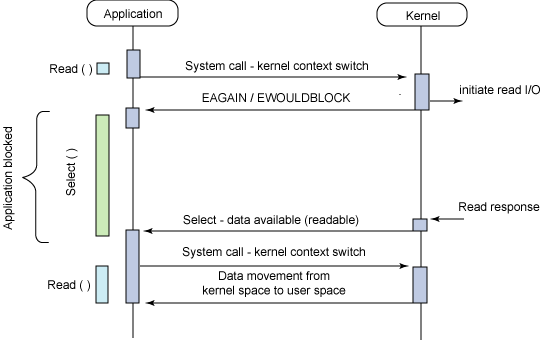
For reference, this is also covered in IBM’s 2006 post Boost application performance using asynchronous I/O.
Async + blocking workflow
In the diagram above, you’ll notice a select() function in the middle — this is the one that blocks the process while simultaneously handling multiple I/O operations. It’s provided as a C API; you can simply include <sys/select.h> and use it.
int select (int nfds, fd_set *readfds, fd_set *writefds,
    fd_set *exceptfds, struct timeval *timeout);
Here, nfds is the number of files to monitor, and the fd_set structs represent file lists to watch for read data, written data, and exceptions respectively. “fd” stands for File Descriptor. When a monitored file triggers I/O, the corresponding value in its bit array structure is set to 1.
[0, 0, 1, 0, 0, 0, 0, 0]
// If the 3rd file in the list has changes, the FD bit array structure is updated
The timeout argument (a timeval struct) specifies how long to monitor. In other words, select blocks the parent process for the duration specified in timeout while continuously watching its file list. During monitoring, if reads, writes, or exceptions occur on any files, select returns the number of files that need processing when it terminates.
That’s roughly how select — the quintessential example of async & blocking — works. To summarize: it halts the process for a set duration, watches its monitored files for I/O, and when time is up, returns the I/O results and unblocks the process.
This approach is intuitive for developers because it’s blocking, and because it’s asynchronous, it can monitor and handle multiple I/O operations simultaneously. However, the performance isn’t great, so IBM recommends avoiding it for high-performance applications.
Wrapping Up
I first learned about synchronous concepts in a networking course in college, but back then, my understanding was pretty shallow — just the idea that two devices communicate by aligning their clocks and frame sizes.
But as I kept studying and working as a developer, I encountered the concept in different contexts — synchronous I/O, synchronous programming, and more. As I mentioned at the beginning, everyone had different interpretations: some said it means things happen at the same time, others said it’s about communicating on a clock, and still others described it as waiting for the previous task to finish. The inconsistency was confusing.
 Why does everyone explain it differently...?
So while writing this post, I went back to studying what the word “Synchronous” actually means. Once I understood the nuance of the word, it became somewhat clear why all these different interpretations exist. Since the word itself carries an inherent meaning, it really does come down to interpretation.
In any case, setting everything else aside, I think the biggest takeaway from this post is understanding that the word “Synchronous” carries the nuance of “things progressing identically at the same time.”
And with that, I’ll close this post on what synchronous really means.