Client-Side Rendering Optimization
Rendering Optimization Strategies to Improve SEO and User Experience

In this post I want to write about the client-side rendering optimization I worked on at my current workplace. In Chrome browser’s Audits tab, you can check metrics like the current page’s performance and SEO score.
These metrics are measured using a tool called Lighthouse provided by the Google Chrome team. You can also export the measured metrics in JSON format, save them, and check them again in Lighthouse’s Report Viewer page. Looking at the links below will help you understand Lighthouse better.
Lighthouse Github Repository
Google Developer’s Lighthouse Documentation
Lighthouse Report Viewer
Why Did I Start Optimization?
I’m developing a service called Soomgo at work. At Soomgo we proceed with work in 1-week sprints. This week happened to be when the issue I was going to work on got blocked by another issue, so I had some free time. So while looking around for what to do, I ran Audits once on Soomgo’s Find a Pro page and found that the FMP (First Meaningful Paint) item took almost 2 seconds.
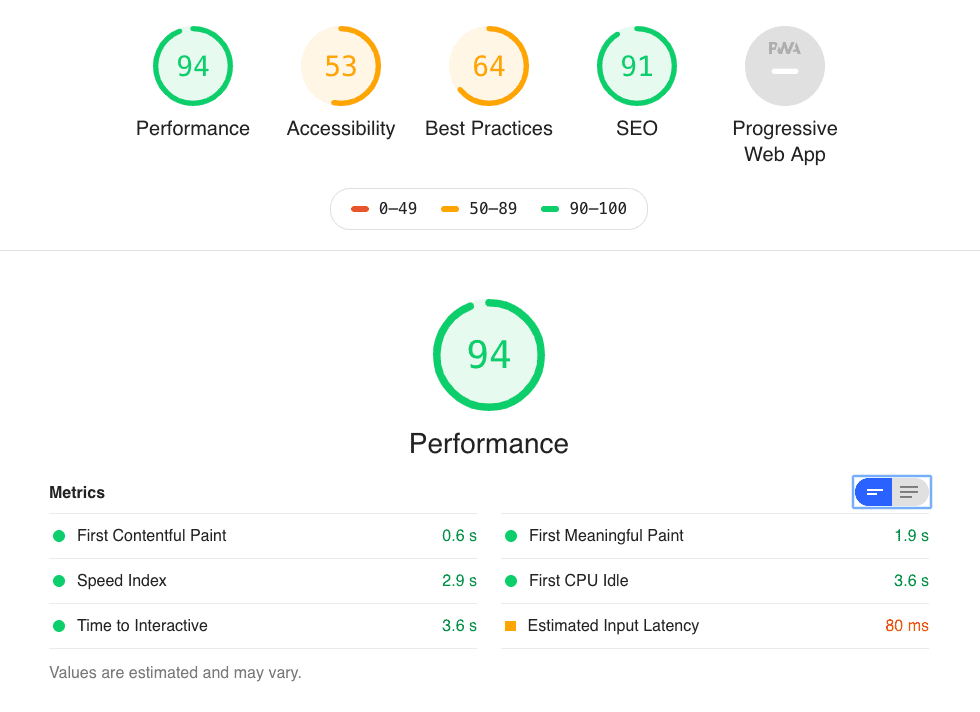 Results of analyzing Soomgo's Find a Pro page
Since that page is one of the SEO optimization target pages, I started optimization with the goal of reducing FMP to under 1 second.
Actually, before this work, that page had already undergone optimization work with colleagues multiple times, so the page’s loading speed itself isn’t bad. However, previous optimizations focused on the render server rather than the client, so this was actually the first time confirming bottleneck points in client rendering.
Identifying Problems
First, among various problems Lighthouse pointed out in audit results, I identified problems I could solve quickly in a short time. Originally this issue wasn’t an issue that entered the sprint but something I did because I coincidentally had spare time, so if I fell into yak shaving or got too greedy and took too long, I couldn’t handle important business issues. Among them, parts I thought I could prioritize and improve in a short time were as follows:
Not Using Text Compression
Usually resources treated as text or code like text/html or application/javascript use gzip compression. But currently the render server was only performing gzip compression for text/html type.
Offscreen Images Need Deferral
Offscreen images mean images that exist in code but aren’t actually shown to users because they’re outside the screen or hidden by CSS styles. Naturally I thought lazy loading these images would be good.
Network Payload Size Too Large
This problem relates to the aforementioned not using text compression. Literally it means the data size that needs to be received when requesting resources once is too large. This issue can be solved with gzip compression and code chunking.
Minimize Main Thread Work
It means when the browser initializes the web application, executing JavaScript takes too long, causing a bottleneck in rendering elements on screen. Various methods came to mind to solve this problem, from really minor optimizations to methods that can show big effects with just a little work. Since minor optimizations are honestly pointless, I had to choose methods that could get maximum effects with minimum cost.
Ensure Text Remains Visible During Webfont Load
If no measures are taken, browsers render webfonts differently according to their respective policies. Webkit camp browsers like Chrome, Firefox, Safari, Opera render webfonts using the FOIT (Flash of Invisible Text) method that doesn’t show text with fonts applied until webfont download completes, while IE/Edge renders webfonts using the FOUT (Flash of Unstyled Text) method that exposes text with default fonts applied until webfont download completes.
Therefore, Lighthouse recommended using the FOUT method where users can check page content regardless of whether webfont download completes.
Actions
Image Lazy Loading
Image lazy loading can be simply implemented using HTML5’s IntersectionObserver. But one thing I worried about was “If I do lazy loading, won’t Google’s Search Engine Bot fail to scrape images?”
So I did a bit of research to see how other people think about this. There were several methods like using <noscript> tags, making image sitemaps using XML, and some said Google’s Search Engine Bot indexes all images loaded using lazy loading anyway, so you don’t need to worry.
So I discussed this problem with the PO (Product Owner). As a result, since images on the Find a Pro page are only user profile images anyway, and these images were judged to have no major SEO impact whether indexed or not, we decided to just apply lazy loading without separate measures.
Since Soomgo frontend uses Vue, I implemented image lazy loading functionality using Vue’s Directive and HTML5’s IntersectionObserver API. First, inside the component rendering user profile images, since it’s rendering user profiles using CSS’s background-image property rather than img tags, the interface of this directive I envisioned was roughly like this:
<div class="test" v-lazy-background-image></div>
<!-- After directive binding -->
<div
  class="test"
  v-lazy-background-image
  data-lazy-background-image="Let's remove image URL from styles and store image URL here">
</div>
.test {
background-image: url(https://assets.soomgo.com/user/example.jpeg);
}
/* After directive binding */
.test {}When there’s an element like this, the lazy-background-image directive accesses the bound element’s style property, and if there’s a background-image property, it seemed like it could store that URL in a separate property then lazy load that image when the element enters the viewport.
If envisioned up to here, just implement the Observer simply. But there’s one thing you mustn’t overlook - many browsers don’t yet support the IntersectionObserver API. Therefore, you must handle exceptions for these browsers. For support status of the IntersectionObserver API, refer to Can I Use IntersectionObserver.
const isSupportIntersectionObserver = 'IntersectionObserver' in window;

const intersectionObserver: IntersectionObserver|null = isSupportIntersectionObserver
  ? new IntersectionObserver((entries: IntersectionObserverEntry[], observer: IntersectionObserver) => {
    entries.forEach(entry => {
      if (entry.isIntersecting) {
        const imageURL: string = entry.target.getAttribute('data-lazy-background-image');
        if (!imageURL.length) {
          return;
        }

        entry.target.style.backgroundImage = imageURL;
        observer.unobserve(entry.target);
      }
    });
  })
: null;IntersectionObserver’s constructor receives as an argument a callback function the Observer will call when actions occur like elements entering or leaving the viewport. In the past, similar actions were handled with scroll events, but since events respond synchronously, they affect main thread responsiveness - simply put, performance.
Since scroll events are called so frequently, you can see problems like screens stuttering if you do just a bit more processing in scroll event handlers. (Using the passive option among event options can defend against this phenomenon to some extent.)
But since Observers operate asynchronously, they execute independently from the main thread’s processing stack. It would be really nice if just the browser support rate being under 90% could be solved…
Now that I’ve implemented the Observer, I just need to whip up the directive.
import { Vue } from 'vue-property-decorator';
import { VNode, VNodeDirective } from 'vue';

Vue.directive('lazy-background-image', {
  bind (el: any, binding: VNodeDirective, vnode: VNode) {
    if (isSupportIntersectionObserver) {
      if (!el.style.backgroundImage) {
        return;
      }
      el.setAttribute('data-lazy-background-image', el.style.backgroundImage);
      el.style.backgroundImage = '';
      intersectionObserver.observe(el);
    }
  },
  unbind (el: any) {
    if (isSupportIntersectionObserver) {
      intersectionObserver.unobserve(el);
    }
  },
});
As a result of lazy loading images using directives like this, I could drastically reduce the number of initially requested images from 60 to 39.


Component Lazy Loading
Soomgo frontend does SSR for the first request for SEO, but otherwise operates the same way as typical SPAs. Therefore, when the application first initializes, it receives all JavaScript and CSS to be used within the application.
This method isn’t really a problem when the application is small, but as the application grows, bundle capacity also increases proportionally, so it inevitably becomes burdensome. So I changed it to asynchronously load and use only code used on that page using Dynamic Import, a feature Webpack provides.
// Sync
import SearchPro from '@/pages/Search/SearchPro';

// Async
const SearchPro = () => import(/* webpackChunkName: "search" */ 'src/pages/Search/SearchPro');
Using the webpackChunkName comment, you can bundle certain units of modules into one chunk. Since Soomgo currently uses HTTP/1.1 protocol, the number of resources that can be requested at once is limited to about 6. (This number differs slightly depending on browser policy)
If the number of chunks gets too large, loading speed can actually slow down, so I bundled related modules together and adjusted so the number of chunks doesn’t get too large.
Up to here was honestly not that difficult and went smoothly, but problems occurred with mini-css-extract-plugin used to separate CSS into separate bundles. Due to how this plugin processes CSS modules loaded with Dynamic import, a ReferenceError: document is not defined reference error occurred in the SSR cycle.
var linkTag = document.createElement("link"); // ReferenceError: document is not defined
linkTag.rel = "stylesheet";
linkTag.type = "text/css";
linkTag.onload = resolve;
linkTag.href = fullhref;
head.appendChild(linkTag);
The original code is huge, but simply distilling it, here’s where the problem occurred. Since the SSR cycle executes in a NodeJS process, naturally there’s no document or anything, so a reference error occurred.
Fortunately, build configuration is managed separately as client.config and server.config, so I could take appropriate measures. Since the client-side rendering cycle has no problems, I just needed to fix it only when Express compiles Vue on the initial request.
Sure enough, developers from around the world who had done the same grunt work as me on StackOverflow had already reached some conclusions through heated discussions about mini-css-extract-plugin’s SSR-related issue. We are the world.
Various methods were discussed, but I chose the method of using css-loader’s exportOnlyLocals option. The issue says to use css-loader/locals, but since css-loader was updated after this issue was discussed, you now need to use an options object.
module.exports = merge(baseConfig, {
  // ...
  module: {
    rules: [
      {
        test: /\.scss$/,
        use: [
          {
            loader: 'css-loader',
            options: { exportOnlyLocals: true }
          },
          'postcss-loader',
          'sass-loader'
        ]
      },
    ]
  }
  // ...
})
I solved the problem like this, but first since this technology’s stability was judged not sufficiently confirmed within the frontend chapter, I’m currently only lazy loading components related to the original target Find a Pro page. If stability is verified in the future, I plan to gradually expand coverage and apply it.
Apply gzip Compression for Text Content
This just requires adding gzip-related settings to Nginx configuration.
server {
  # ...
  gzip on;
  gzip_disable "msie6";

  gzip_proxied any;
  gzip_comp_level 6;
  gzip_buffers 16 8k;
  gzip_http_version 1.1;
  gzip_types text/plain text/css application/json application/javascript text/xml application/xml text/javascript;
}
Actually Soomgo doesn’t support IE6, but I added it just in case, thinking seeing a broken page is better than not being able to see the page at all. After finishing component lazy loading and applying gzip compression for text content, I checked bundle size and loading speed once.
JS
Before

After

CSS
Before

After

That crazy 1.2MB sized bundle at the very top of JS before is the vendor bundling node_modules libraries. My heart always ached and tears came whenever I saw this guy, so I wondered why I dragged this out when it could end this simply.
Changed Pages Needing SEO to Render Pages Immediately Without Waiting for Authentication Process
Actually this relates to Soomgo’s technical debt. The API receiving currently logged-in user information is incredibly slow. Usually response time is about 1.5 seconds, and during traffic peak times it approaches 2 seconds. This is deep technical debt also related to DB schema, so it’s a bit difficult to solve in a short time.
Even so, it’s too wasteful that users have to wait 2 seconds to see the screen due to external network factors. But let’s think about it.
Pages needing SEO are pages non-logged-in users can definitely access.
Huh? Actually it’s such an obvious fact but I was missing it. Then this stream of consciousness arises:
- The goal was to shorten loading time of pages where SEO is important.
- Pages being SEO’d are pages non-logged-in users can access anyway.
- No need to wait for auth API…?
Then just
// ...
router.onReady(async () => {
  if (isAllowGuestPage(router.currentRoute)) {
    init();
  }
  else {
    await init();
  }
  // ...
});
Just fire it off like this. I changed it to check router permission and execute the next initialization logic without waiting for init’s promise for pages non-member users can access. As a result, I could confirm loading speed of non-member accessible pages became about 1 second faster.
| Before | After |
|---|---|
| 2513.9ms | 1111.5ms |
Results
Working hard on this and that, it did get a bit faster.
Before
After
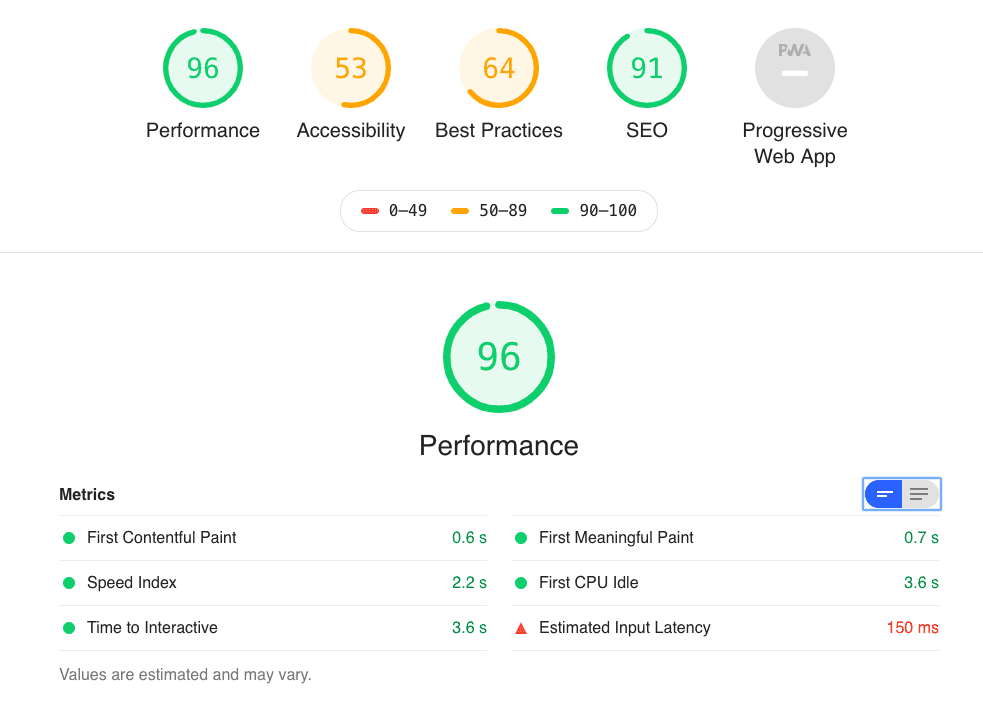
I achieved the original goal of dropping FMP below 1 second, but I didn’t know other numbers wouldn’t be affected this much. Performance score also only went up a measly 2 points. Other team members said “Still, 2 points is something~” but something feels unsettled in one corner of my heart…
Next time I should set a goal of raising other scores a bit more. Setting up PWA might raise the Accessibility score a bit more, but other issues I’m thinking of require backend developers’ help quite a bit, so it seems difficult alone.
That’s all for this post on client-side rendering optimization.
관련 포스팅 보러가기
People Create Excellence, but Systems Make It Last
Essay[JS Prototypes] Implementing Inheritance with Prototypes
Programming/JavaScriptBeyond Classes: A Complete Guide to JavaScript Prototypes
Programming/JavaScriptHeaps: Finding Min and Max Values Fast
Programming/Algorithm[Making JavaScript Audio Effectors] Creating Your Own Sound with Audio Effectors
Programming/Audio